
Genjutsu AI Video Generator
Turn people into characters, swap objects and restyle videos with AI. Upload a clip, pick the seconds you want, and the result follows your original motion and camera.
Create Your VideoTurn the person in your clip into a cartoon, 3D or anime character — motion, camera and timing follow your original clip. · Powered by Motion Transfer
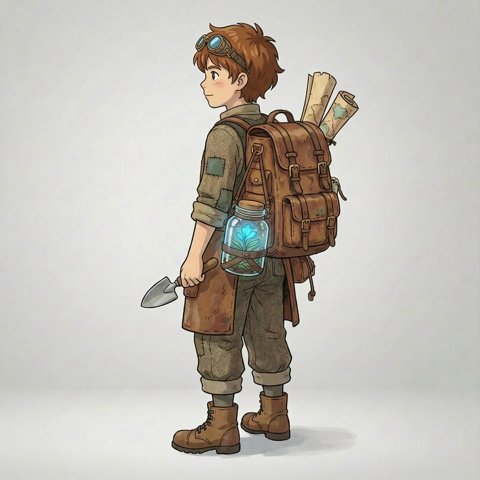
Reference images (required) — One fictional character — anime, illustrated, cartoon or non-photorealistic 3D.
Best results: one clear, full-body illustrated, anime or 3D character per image, on a plain background. Photos of real people are not accepted.
Genjutsu AI Examples
Same motion, same camera, new reality. Tap Original to see the source clip.
Change Style
A night walk through Tokyo, redrawn as anime. Every step, sign and camera move stays where it was.
 Reference
Character Swap
Same walk, new world: the performer becomes an illustrated explorer from one reference image, and the park becomes an island.
Swap Anything
Only the outfit changes: a painter's apron becomes a royal gown and crown, while the studio and her expression stay put.
Sample clips from public video-to-video model demos. Your results depend on the mode and the clip you upload.
What Is Genjutsu AI?
Genjutsu AI is a video-to-video generator. Instead of inventing a shot from a text prompt, it starts from a clip you already filmed and keeps everything that made the take work — the movement, the camera path, the timing and the cuts.
Then it rewrites what is in the frame. Put a new character into the performance, replace a product or a prop, move the scene somewhere else, or repaint the whole clip in a new style. It runs in your browser: no install, no rotoscoping, no green screen.
How to Use Genjutsu AI in 3 Steps
- 1
Upload your clip
Drop in the video whose motion you want to follow — a phone clip is enough. Pick 3–10 seconds as the reference, then choose how long the result should be.
- 2
Add your character or object
Pick a mode, add reference images of the character, product or outfit, and describe what should change and what must stay.
- 3
Generate and download
See the credit cost before you start. Renders take a few minutes; failed jobs are refunded automatically.
Genjutsu AI Motion Transfer
Keep the take, recast the performer. Upload a clip and one image of an illustrated, anime or 3D character, and that character steps into your footage with the same moves, the same camera and the same rhythm. The scene around the performer stays as filmed, so the new take sits naturally beside the rest of your footage. Good for mascots, presenters, short-form skits and any shot you would rather not stage twice.
- Same timing and cuts as the original take
- One character reference image per clip
- 768P or 2K output, 3–10 second source clips
Real use: A language teacher records a 5-second greeting once and turns it into an animated host that opens every lesson in the course.
How Genjutsu Motion Transfer works →Genjutsu AI Object Swap
Edit what is in the shot, not the shot itself. Name the thing to replace in a short prompt, optionally attach a picture of what should take its place, and the rest of the frame — light, shadows, hands and camera path — is carried over from your original footage. Good for product refreshes, wardrobe changes and moving a scene to a new location.
- Product and prop replacement without a reshoot
- Point at references in the prompt with @Image1, @Image2
- Pick any 3–10 seconds of your video
Real use: A café films its counter once and drops in each month's seasonal cup design, so the menu video stays current without a new shoot.
How Genjutsu Object Swap works →Genjutsu AI Restyle
Restyle repaints every frame of your clip in a new visual language while the motion underneath stays put. Start from one of eight presets — anime, 3D cartoon, claymation, watercolor, cyberpunk, film noir, pixel art or oil painting — then use the prompt box to fine-tune lighting, palette, texture or era. The subject still walks the same path, and the camera still moves exactly the way it did when you shot it. Works on 3–10 second clips with 4–15 second output.
- 8 style presets plus a custom prompt
- Same simple price as every mode: 1 credit per second
- 3–10 second clips
Real use: A travel creator shot a night walk through Tokyo. Restyled to anime, every sign, reflection and footfall stays in place, but the whole city turns into cel-shaded line art — a new look for footage that already existed.
Explore Genjutsu Restyle →Genjutsu AI Free — What You Get
Every new account gets free credits — enough for a short test clip on your own footage before you pay anything. No card needed. After that, buy a credit pack or subscribe when you need more. 1 credit = 1 second of generated video.
Try Genjutsu AI freePricing
Every plan is priced in credits. 1 credit = 1 second of 768P video; 2K uses 2 credits per second. Buy a pack once, or subscribe for a lower price per credit.
Starter
10 credits
- = 10s of 768P or 5s of 2K video
- ≈ 2 five-second 768P videos
- $0.99 per credit
- Credits never expire
- Character Swap, Swap Anything and Change Style
- Failed renders refunded automatically
- Free download, commercial license
Creator
30 credits
- = 30s of 768P or 15s of 2K video
- ≈ 6 five-second 768P videos
- $0.63 per credit
- Credits never expire
- Character Swap, Swap Anything and Change Style
- Failed renders refunded automatically
- Free download, commercial license
Credit Pack
100 credits
- = 100s of 768P or 50s of 2K video
- ≈ 20 five-second 768P videos
- $0.35 per credit
- Credits never expire
- Character Swap, Swap Anything and Change Style
- Failed renders refunded automatically
- Free download, commercial license
Bulk Pack
500 credits
- = 500s of 768P or 250s of 2K video
- ≈ 100 five-second 768P videos
- $0.30 per credit
- Credits never expire
- Character Swap, Swap Anything and Change Style
- Failed renders refunded automatically
- Free download, commercial license
Genjutsu AI FAQ
What is Genjutsu AI?+
Genjutsu AI is an online video-to-video generator. You upload a real clip and choose what to rewrite — the characters, an object or scene, or the whole visual style — while the original motion, camera movement and timing are preserved.
Which AI model powers Genjutsu AI?+
All three modes — Character Swap, Swap Anything and Change Style — run on MiniMax H3, a reference-to-video model. Genjutsu AI is an independent product and is not made by or affiliated with MiniMax.
Can I use Genjutsu AI for free?+
Yes. New accounts get free credits for a short test clip, so you can see the results before buying a credit pack. No card is required. 1 credit = 1 second of Standard video.
What is the difference between Character Swap, Swap Anything and Change Style?+
Character Swap (motion transfer) turns the performer in your clip into an illustrated, cartoon or 3D character from your reference image. Swap Anything (object swap) replaces a specific product, prop, outfit or background. Change Style (restyle) repaints the entire clip in a new visual style.
How long can my video be?+
Upload an MP4 or MOV up to 2 minutes and 100MB, then select the 3–10 seconds to transform — only that clip is used. Credits are based on the length of the video you generate (4–15 seconds).
How are credits calculated?+
Each job costs credits based on the mode, resolution and clip length, rounded up to the next second. You always see the exact cost before you press Generate, and failed jobs are refunded automatically.
Can I use a photo of a real person as the reference?+
No. Character Swap references must be illustrated, cartoon, anime or 3D characters — photos of real people, including yourself, public figures and minors, are not accepted. Your source video may show real people only if you have their permission. Genjutsu AI is not a face-swap or deepfake tool.
Can I use the videos commercially?+
Yes, as long as you own or have rights to the footage and references you upload and your use follows our Terms of Service.